
Build repeatable workflows across busy inboxes and shared drives. Bring relevant information together, extract the data you need and publish tailored views, reports and updates for your team and customers.
From: updates@cedarworks.example
Delivery is planned for 18 October.
Internal price: £12,400
We'll confirm once it's on route.
Team
Delivery date: 18 October
Internal price: £12,400
Customer
Delivery date: 18 October
Press Escape or focus this heading to stop the changing words.
What you can do with Polytrace
Organize and triage
-
Supplier updates - Northbank
- Invoice received
- Cedar Works
- Delivery update
- Fieldline
- Renewal date
Organize and share your emails
Create custom lists of emails from multiple inboxes and keep their attachments easy to find.
-
Inbox routing - Customer requests
- For review
- Delivery updates
- Forward to Operations
Triage and route incoming emails
Sort incoming requests into review queues and forward matching messages to the right team.
-
Saved emails - Contract proposal
- Cedar Works
- Delivery update
- 10 October
Keep project information together
Find a project’s correspondence and save useful groups of emails or documents.
-
Review set - Email thread
- Selected
- Contract.pdf
- Selected
- Project notes
- Selected
Prepare a review or handover
Give the next reviewer the relevant emails, document versions and unanswered questions.
Extract data and keep it current
-
Extracted invoice fields - Amount
- £12,400
- Source
- Invoice.pdf
- Date
- 14 October
Extract data from emails and documents
Extract amounts, dates and references, then check the values against their source.
-
Supplier profile - Name
- Cedar Works
- Delivery date
- 18 October
- Status
- On route
Keep contract and supplier data up to date
See the latest delivery dates and contract details from new captured updates, with the email or document behind each value.
Watch changes and get notified
-
Delivery alert - When
- Delivery date changes
- Notify
- Operations team
- Channel
- Instant email
Get alerts for changes and deadlines
Watch delivery dates, prices and renewal deadlines. Choose email, digest or webhook notifications and control how often they arrive.
-
Follow-up - Owner
- Mira
- Due date
- 16 October
- Status
- In progress
Assign follow-up and record the outcome
Give work an owner, due date and outcome.


How you can use Polytrace
-
Operations and procurement
Follow supplier delivery changes and upcoming notice deadlines.
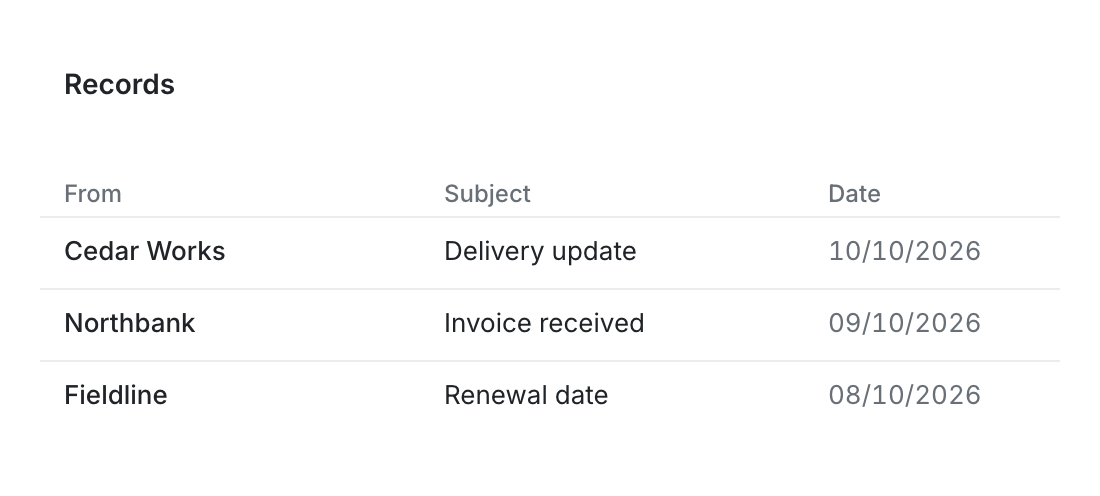
Example for operations From Subject Date Cedar Works Delivery update 10 October -
Accounting
Check invoice amounts and due dates beside originals.
Example for accounting Invoice Amount Due date INV-0442 £12,400 18 October -
Investment teams
Prepare company reviews with reports and follow-up questions.
Example for investment Document Review question Acme Supplies Q3 report.pdf How does gross margin compare with last quarter? -
Sales and account teams
Hand over customer requests and proposal changes.
Example for sales Customer request Source Multi-year pricing and UK delivery options Proposal v3.pdf -
Support and customer success
Sort incoming requests and keep the conversation ready for the next handler.
Example for support From Subject Date Northbank Invoice query 10 October Fieldline Renewal question 8 October -
Legal and compliance
Gather the documents for a review and follow terms to their original clauses.
Example for legal Item Original source Retained version Email Cedar Works email.eml Document Terms.pdf terms.pdf Website copy Supplier terms terms.html
Check the details. Choose what to share.
From: updates@cedarworks.example
Delivery is planned for 18 October.
Internal price: £12,400
We'll confirm once it's on route.
Team
Delivery date: 18 October
Internal price: £12,400
Customer
Delivery date: 18 October
-
Check the source.
Check an extracted amount or date beside the email or document it came from.
-
Keep data up to date.
Keep the latest checked supplier or contract details together as new updates are captured.
-
Control what you share.
Share the fields each audience needs, with separate controls for the original files.
-
Assign follow-up.
Give a question an owner and keep the answer beside the emails and documents behind it.
-
Check how data is processed.
See which emails or documents were included and how an amount, date or reference was extracted.
-
Use generative AI when needed.
Organize and publish without generative AI. Use a model for extraction when the text needs interpretation.


Find an example for your industry
View all industries-
Financial services
Check counterparty terms and notice dates against agreements and correspondence, and prepare evidence for oversight reviewers.

-
Professional services
Keep client scope changes beside proposals and deliverables, with open questions and document versions ready for account handover.

-
Manufacturing and logistics
Connect supplier emails with SFTP shipment files, extract order lines and compare revised delivery promises for planning.

-
Real estate and construction
Check lease notice dates against clauses and amendments, and keep RFIs and quoted project changes beside the relevant drawing versions.

-
Healthcare
Organize administrative intake, track missing identifiers and payer questions, and share records with authorized recipients.

-
Insurance
Keep claim evidence requests, policy notices and outstanding questions together for the handler, with separate recipient access.